
Looking for a LinkedIn emoji to drop into your post, your headline or a message? Right below, you'll find the full list of emojis to copy and paste, sorted by category, with special characters and kaomojis as a bonus.
Pick the emoji you like, copy it, then paste it into LinkedIn. To go faster next time, the rest of this guide shows you the keyboard shortcuts on PC, Mac and mobile, then how to choose the right emoji for your goal without losing credibility.
LinkedIn emoji list to copy and paste
All the emojis are in the first table, sorted by category. These tables work anywhere you write on LinkedIn: posts, comments, headline, About section or messages. Every emoji is a Unicode character, so you can also paste it into Instagram, an email or a document.
LinkedIn emoji table by category
Here's the full list of LinkedIn emoticons, sorted by theme: smileys, gestures, office items, symbols, arrows, numbers, flags, and every skin tone.
Category | LinkedIn emojis to copy and paste |
|---|---|
To liven up a post | ⚡️ 🔥 💥 🚀 📍📞 ✅ 📣 📢 ✔️ ➡️ ⤵️ ❗️ ❓ 💯 ♻️ |
Hands and gestures | 👏 👋 👌 👐 🤞👂 👍🏻 👈 ☝️ 💪 ✍️ 👃 👎 👉 ✌️ 🙏 👊 👆 ✋ 🖖 ✊ 🙌 👇 🖐 🤘 👀 👁 🗣 👤 👥 |
Smileys and expressions | 😊 🙂 😃 😄 😁 😆 😂 🤣 😅 😗 😙 😘 🥰 😍 🤗 🤩 😛 😜 😝 😋 🙃 🤭 😉 😐 🤨 🤔 😕 😶 🙄 😳 🥺 😮 😦 😧 😯 😲 😨 😱 😰 😭 😟 😞 😌 😢 😣 😖 😫 😩 😓 😪 🙁 😒 😤 😡 😠 🤬 🤢 🤮 😈 👿 😇 😎 😴 😷 🤧 🤒 🤕 🧐 🤠 🤓 👶 🤑 🤐 🤥 🤯 😬 🤪 😵 🥳 🥱 🥴 🥵 🥶👽👾 🤖 🧒 👦 👧 🧑 👨 👩 🧓 👴 👵 |
Office, tech and objects | ⌚️ 📱 📲 💻 ⌨ 💽 💾 💿 📀 📼 📷 📹 🎥 📞 ☎️ 📟 📠 📺 📻 ⏰ ⏳ ⌛️ 📡 🔋 🔌 💡 🔦 💸 💵 💴 💶 💷 💰 💳 💎 🔧 🔨🔩 🔭 🔬 🔖 🔑 🚪🎈 🎏 🎀 🎁 🎊 🎉 ✉️ 📩 📨 📧 💌 📮 📪 📫 📬 📭 📦 📯 📥 📤 📜 📃 📑 📊 📈 📉 📄 📅 📆 📇 📋 📁 📂 📰 📓 📕 📗 📘 📙 📔 📒 📚 📖 🔗 📎 ✂️ 📐 📏 📌 📍 🚩 🔐 🔒 🔓 🔏 ✒️ 📝 ✏️ 🔍 🔎 💬 💭🗣 |
Hearts | 🌈 💘 💝 💖 💗 💓 💞 💕 💟 ❣️ 💔 ❤️ 🧡 💛 💚 💙 💜 🖤 |
People | 👦 👧 👨 👩 👱 👴 👵 👲 👳 👮 👷 💂 🎅 👼 👸 👰 🚶 🏃 💃 👯 👫 👬 👭 🙇 💁 🙅 🙆 🙋 🙎 🙍 💇 💆 💑 👩❤️👩 👨❤️👨 💏 👩❤️💋👩 👨❤️💋👨 👪 👨👩👧 👨👩👧👦 👨👩👦👦 👨👩👧👧 👩👩👦 👩👩👧 👩👩👧👦 👩👩👦👦 👩👩👧👧 👨👨👦 👨👨👧 👨👨👧👦 👨👨👦👦 👨👨👧👧 👚 👕 👖 👔 👗 👙 👘 💄 💋 👣 👠 👡 👢 👞 👟 👒 🎩 🎓 👑 🎒 👝 👛 👜 💼 👓 💍 🌂 |
Skin tones | 👦🏼 👧🏼 👨🏼 👩🏼 👴🏼 👵🏼 👶🏼 👱🏼 👮🏼 👲🏼 👳🏼 👷🏼 👸🏼 💂🏼 🎅🏼 👼🏼 💆🏼 💇🏼 👰🏼 🙍🏼 🙎🏼 🙅🏼 🙆🏼 💁🏼 🙋🏼 🙇🏼 🙌🏼 🙏🏼 🚶🏼 🏃🏼 💃🏼 💪🏼 👈🏼 👉🏼 ☝️🏼 👆🏼👇🏼 ✌️🏼 🖖🏼 ✊🏼 ✋🏼 👊🏼 👌🏼 👍🏼 👎🏼 👋🏼 👏🏼 👐🏼 💅🏼 👂🏼 👃🏼 🚣🏼 🛀🏼 🏄🏼 🏇🏼 🏊🏼 🚴🏼 🚵🏼 👦🏽 👧🏽 👨🏽 👩🏽 👴🏽 👵🏽 👶🏽 👱🏽 👮🏽 👲🏽 👳🏽 👷🏽 👸🏽 💂🏽 🎅🏽 👼🏽 💆🏽 💇🏽 👰🏽 🙍🏽 🙎🏽 🙅🏽 🙆🏽 💁🏽 🙋🏽 🙇🏽 🙌🏽 🙏🏽 🚶🏽 🏃🏽 💃🏽 💪🏽 👈🏽 👉🏽 ☝️🏽 👆🏽 👇🏽 ✌️🏽 🖖🏽 ✊🏽 ✋🏽 👊🏽 👌🏽 👍🏽 👎🏽 👋🏽 👏🏽 👐🏽 💅🏽 👂🏽 👃🏽 🚣🏽 🛀🏽 🏄🏽 🏇🏽 🏊🏽 🚴🏽 🚵🏽 👦🏾 👧🏾 👨🏾 👩🏾 👴🏾 👵🏾 👶🏾 👱🏾 👮🏾 👲🏾 👳🏾 👷🏾 👸🏾 💂🏾 🎅🏾 👼🏾 💆🏾 💇🏾 👰🏾 🙍🏾 🙎🏾 🙅🏾 🙆🏾 💁🏾 🙋🏾 🙇🏾 🙌🏾 🙏🏾 🚶🏾 🏃🏾 💃🏾 💪🏾 👈🏾 👉🏾 ☝️🏾 👆🏾👇🏾 ✌️🏾 🖖🏾 ✊🏾 ✋🏾 👊🏾 👌🏾 👍🏾 👎🏾 👋🏾 👏🏾 👐🏾 💅🏾 👂🏾 👃🏾 🚣🏾 🛀🏾 🏄🏾 🏇🏾 🏊🏾 🚴🏾 🚵🏾 👦🏿 👧🏿 👨🏿 👩🏿 👴🏿 👵🏿 👶🏿 👱🏿 👮🏿 👲🏿 👳🏿 👷🏿 👸🏿 💂🏿 🎅🏿 👼🏿 💆🏿 💇🏿 👰🏿 🙍🏿 🙎🏿 🙅🏿 🙆🏿 💁🏿 🙋🏿 🙇🏿 🙌🏿 🙏🏿 🚶🏿 🏃🏿 💃🏿 💪🏿 👈🏿 👉🏿 ☝️🏿👆🏿👇🏿✌️🏿🖖🏿 ✊🏿 ✋🏿 👊🏿 👌🏿 👍🏿 👎🏿 👋🏿 👏🏿 👐🏿 💅🏿 👂🏿 👃🏿 🚣🏿 🛀🏿 🏄🏿 🏇🏿 🏊🏿 🚴🏿 🚵🏿 |
Sports and leisure | ⚽️ 🏀 🏈 ⚾️ 🎾 🏉 🎱 ⛳️ 🎿 🏂 🎣 🚣 🏊 🏄 🛀 🚴 🚵 🏇 🏆 🎽 🎫 🎭 🎨 🎪 🎤 🎧 🎼 🎹 🎷 🎺 🎸 🎻 🎬 🎮 👾 🎯 🎲 🎳 |
Places and transport | 🚗 🚕 🚙 🚌 🚎 🚓 🚑 🚒 🚐 🚚 🚛 🚜 🚲 🚨 🚔 🚍 🚘 🚖 🚡 🚠 🚟 🚃 🚋 🚝 🚄 🚅 🚈 🚞 🚂 🚆 🚇 🚊 🚉 🚁 ✈️ ⛵️ 🚤 🚀 💺 ⚓️ 🚧 ⛽️ 🚏 🚦 🚥 🏁 🚢 🎡 🎢 🎠 🌁 🗼 🏭 ⛲️ 🎑 🗻 🌋 🗾 ⛺️ 🌅 🌄 🌇 🌆 🌃 🌉 🌌 🌠 🎇 🎆 🌈 🏰 🏯 🗽 🏠 🏡 🏢 🏬 🏣 🏤 🏥 🏦 🏨 🏪 🏫 🏩 💒 ⛪️ |
Food and drinks | 🍏 🍎 🍐 🍊 🍋 🍌 🍉 🍇 🍓 🍈 🍒 🍍 🍅 🌽 🍠 🍯 🍞 🍗 🍖 🍤 🍳 🍔 🍟 🍕 🍝 🍜 🍲 🍥 🍣 🍱 🍛 🍙 🍚 🍘 🍢 🍡 🍧 🍨 🍦 🍰 🎂 🍮 🍬 🍭 🍫 🍩 🍪 🍺 🍻 🍷 🍸 🍹 🍶 🍵 ☕️ 🍼 🍴 |
Animals and nature | 🐶 🐱 🐭 🐹 🐰 🐻 🐼 🐨 🐯 🐮 🐷 🐽 🐸 🐙 🐵 🙈 🙉 🙊 🐒 🐔 🐧 🐦 🐤 🐣 🐥 🐺 🐗 🐴 🐝 🐛 🐌 🐞 🐜 🐍 🐢 🐠 🐟 🐡 🐬 🐳 🐋 🐊 🐆 🐅 🐃 🐂 🐄 🐪 🐫 🐘 🐐 🐏 🐑 🐎 🐖 🐀 🐁 🐓 🐕 🐩 🐈 🐇 🐾 🐉 🐲 🌵 🎄 🌲 🌳 🌴 🌱 🌿 ☘ 🍀 🎍 🎋 🍃 🍂 🍁 🌾 🌺 🌻 🌹 🌷 🌼 🌸 💐 🍄 🌰 🎃 🐚 |
Weather and space | 🌎 🌍 🌏🌠 🌌 🪐🌐🌕 🌖 🌗 🌘 🌑 🌒 🌓 🌔 🌚 🌝 🌛 🌜 🌞 🌙 ⭐️ 🌟 💫 ✨ ☀️ ⛅️ ☁️ ⛈️ 🌤️ 🌥️ 🌦️ 🌧️ 🌨️ 🌩️ 🌪️⚡️ 🔥 ☄️💥 ❄️ ⛄️ 💨 ☔️ 💧 💦 🌊🌫️ 🌬️ 🌀 🌈 |
Symbols and alerts | 🆘 ⛔️ 📛 🚫 ❌ ⭕️ 💢 ♨️ 🚷 🚯 🚳 🚱 📵 ❗️ ❕ ❓ ❔ ‼️ ⁉️ 💯 🔅 🔆 🔱 ⚜ 〽️ ⚠️ 🚸 🔰 ♻️ 💹 ❇️ ✳️ ❎ ✅ |
Arrows | ▶️ ⏩ ⏪ ⏸️ ⏹️ ⏺️ ⏏️🔀 🔁 🔂 ◀️ 🔼 🔽 ⏫ ⏬ ➡️ ⬅️ ⬆️ ⬇️ ↗️ ↘️ ↙️ ↖️ ↕️ ↔️ 🔚 🔙 🔛 🔝 🔜 ↪️ ↩️ ⤴️ ⤵️ ℹ️ 👈 👉 👆 👇 📌 📍 📎 🔶 🔷 🔸 🔹 🔺 🔻 💠 |
Shapes and colors | 🔴 🟠 🟡 🟢 🔵 🟣 ⚫ ⚪ 🟥 🟧 🟨 🟩 🟦 🟪 ⬛ ⬜ 🔳 🔲 ◼️ ◻️ ◾ ◽ |
Numbers and letters | 0️⃣ 1️⃣ 2️⃣ 3️⃣ 4️⃣ 5️⃣ 6️⃣ 7️⃣ 8️⃣ 9️⃣ 🔟 🔢 ➕ ➖ ➗ ✖️ 🅰️ 🆎 🅱️ 🆒 🆓 ℹ️ 🆔 Ⓜ️ 🆕 🅾️ 🆗 🅿️ 🆘 🆙 🆚 🔠 🔤 |
Clocks and time | 🕛 🕧 🕐 🕜 🕑 🕝 🕒 🕞 🕓 🕟 🕔 🕠 🕕 🕡 🕖 🕢 🕗 🕣 🕘 🕤 🕙 🕥 🕚 🕦 ⌚ ⏰ ⏱️ ⏲️ 🕰️ |
Flags |
|
The best emojis for LinkedIn and what they mean
Not sure what an emoji means? Here are the most used LinkedIn emojis and what they mean in a professional context.
Emoji | Meaning | When to use it |
|---|---|---|
🚀 | Launch, growth. | Announcing a project, a new job or a funding round. |
🎯 | Goal, precision. | Presenting a target, a result or a goal you've hit. |
💡 | Idea, tip. | Introducing a tip or a lesson learned. |
✅ | Done, approved. | Structuring a list of steps or best practices. |
👉 | Look here. | Pointing to information, a link or a call to action. |
📌 | Key point. | Highlighting the main takeaway of a post. |
📊 | Data, analysis. | Sharing figures, a study or a report. |
📈 | Growth, progress. | Showing a positive trend. |
🔥 | Trending, energy. | Highlighting big news or a standout result. |
🙏 | Thanks, gratitude. | Thanking your network, a team or a client. |
👏 | Well done. | Congratulating someone on an achievement. |
🤝 | Partnership, deal. | Announcing a collaboration or a signed deal. |
💬 | Discussion. | Inviting your network to comment. |
📣 | Announcement. | Sharing important news or a job opening. |
🔗 | Link. | Flagging a link in the comments or at the end of a post. |
👀 | Teaser, curiosity. | Building anticipation before an announcement. |
🎉 | Celebration. | Celebrating a company anniversary or a milestone. |
📍 | Location. | Pointing to a city, a trade show or an event. |
⏳ | Countdown. | Reminding people of a deadline. |
🧠 | Reflection. | Sharing an analysis or a line of thought. |
Special characters and symbols for LinkedIn
Want to structure your text without piling up emojis? Symbols do the job. They work as bullet points, dividers or visual markers, and they look more understated than a colorful emoji. If you want to go further with LinkedIn post formatting, keep this table handy.
Type | Symbols to copy and paste |
|---|---|
Bullets and shapes | ➤∎ ■ ◘ □ ▢ ◉ ◎ ● ⊗ ⊖ ⊝ ⊕ ⬬ ⬭ ⬮ ⬯○ ● ▪ • ‣ ♦ ♠ ◌ ◕ ○ ❍ |
Squares and blocks | ❏ ❐ ❑ ❒ ▀ ▁ ▂ ▃ ▄ ▅ ▆ ▇ ▉ ▊ ▋ █. ▌ ▍ ▎ ▏▐ ░ ▒ ▓ ▔ ▕ ╍ ╏ ■ □ ▢ ▣ ▤ ▥ ▦ ▧ ▨ ▩. ▬ ▭ ▮ ▯ ☰ ☲ ☱ ☴ ☵ ☶ ☳ ☷ ◪ ◩ |
Triangles | ▲ ▼ ◄ ► ◣ ◢ ◥ ▼ ◤ ◥ ▴ ▾ ◂ ▸ △ ▽ ◁ ▷ ⊿ ▻ ◅ ▵ ▹ ◃ ▿⟁ ⧋ |
Stars and asterisks | ⋆ ✢ ✣ ✤ ✥ ❋ ✦ ✧ ✩ ╰☆╮ ✪ ✫ ✬ ✭ ✮ ✯ ✰ ★ ✱ ✲ ❂ ✵ ✶ ✷ ✸ ✹ ✺ ✻ ✼ ❅ ❆ ❈ ❉ ❊ |
Check marks | ✓ ✔ ☑ ✓ √ ✗ ✘ ✕ ☓ ╳ |
Crosses | ✗ ✘☒ ❌ |
Quotation marks | ❝ ❞ « » “ ” |
Styled letters are copied the same way and mimic bold, italics or handwriting. Use them sparingly. Screen readers struggle to read them, and LinkedIn search doesn't recognize them as regular words. Keep them for a word or two, never a whole paragraph.
Style | Alphabet to copy and paste |
|---|---|
Bold | 𝐚𝐛𝐜𝐝𝐞𝐟𝐠𝐡𝐢𝐣𝐤𝐥𝐦𝐧𝐨𝐩𝐪𝐫𝐬𝐭𝐮𝐯𝐰𝐱𝐲𝐳 𝐀𝐁𝐂𝐃𝐄𝐅𝐆𝐇𝐈𝐉𝐊𝐋𝐌𝐍𝐎𝐏𝐐𝐑𝐒𝐓𝐔𝐕𝐖𝐗𝐘𝐙 |
Bold italic | 𝒂𝒃𝒄𝒅𝒆𝒇𝒈𝒉𝒊𝒋𝒌𝒍𝒎𝒏𝒐𝒑𝒒𝒓𝒔𝒕𝒖𝒗𝒘𝒙𝒚𝒛 𝑨𝑩𝑪𝑫𝑬𝑭𝑮𝑯𝑰𝑱𝑲𝑳𝑴𝑵𝑶𝑷𝑸𝑹𝑺𝑻𝑼𝑽𝑾𝑿𝒀𝒁 |
Bold sans serif | 𝗮𝗯𝗰𝗱𝗲𝗳𝗴𝗵𝗶𝗷𝗸𝗹𝗺𝗻𝗼𝗽𝗾𝗿𝘀𝘁𝘂𝘃𝘄𝘅𝘆𝘇 𝗔𝗕𝗖𝗗𝗘𝗙𝗚𝗛𝗜𝗝𝗞𝗟𝗠𝗡𝗢𝗣𝗤𝗥𝗦𝗧𝗨𝗩𝗪𝗫𝗬𝗭 |
Italic | 𝘢𝘣𝘤𝘥𝘦𝘧𝘨𝘩𝘪𝘫𝘬𝘭𝘮𝘯𝘰𝘱𝘲𝘳𝘴𝘵𝘶𝘷𝘸𝘹𝘺𝘻 𝘈𝘉𝘊𝘋𝘌𝘍𝘎𝘏𝘐𝘑𝘒𝘓𝘔𝘕𝘖𝘗𝘘𝘙𝘚𝘛𝘜𝘝𝘞𝘟𝘠𝘡 |
Script | 𝓪𝓫𝓬𝓭𝓮𝓯𝓰𝓱𝓲𝓳𝓴𝓵𝓶𝓷𝓸𝓹𝓺𝓻𝓼𝓽𝓾𝓿𝔀𝔁𝔂𝔃 𝓐𝓑𝓒𝓓𝓔𝓕𝓖𝓗𝓘𝓙𝓚𝓛𝓜𝓝𝓞𝓟𝓠𝓡𝓢𝓣𝓤𝓥𝓦𝓧𝓨𝓩 |
Double-struck | 𝕒𝕓𝕔𝕕𝕖𝕗𝕘𝕙𝕚𝕛𝕜𝕝𝕞𝕟𝕠𝕡𝕢𝕣𝕤𝕥𝕦𝕧𝕨𝕩𝕪𝕫 𝔸𝔹ℂ𝔻𝔼𝔽𝔾ℍ𝕀𝕁𝕂𝕃𝕄ℕ𝕆ℙℚℝ𝕊𝕋𝕌𝕍𝕎𝕏𝕐ℤ |
Typewriter | 𝚊𝚋𝚌𝚍𝚎𝚏𝚐𝚑𝚒𝚓𝚔𝚕𝚖𝚗𝚘𝚙𝚚𝚛𝚜𝚝𝚞𝚟𝚠𝚡𝚢𝚣 𝙰𝙱𝙲𝙳𝙴𝙵𝙶𝙷𝙸𝙹𝙺𝙻𝙼𝙽𝙾𝙿𝚀𝚁𝚂𝚃𝚄𝚅𝚆𝚇𝚈𝚉 |
Circled | ⓐⓑⓒⓓⓔⓕⓖⓗⓘⓙⓚⓛⓜⓝⓞⓟⓠⓡⓢⓣⓤⓥⓦⓧⓨⓩ ⒶⒷⒸⒹⒺⒻⒼⒽⒾⒿⓀⓁⓂⓃⓄⓅⓆⓇⓈⓉⓊⓋⓌⓍⓎⓏ |
Negative squared | 🅰🅱🅲🅳🅴🅵🅶🅷🅸🅹🅺🅻🅼🅽🅾🅿🆀🆁🆂🆃🆄🆅🆆🆇🆈🆉 🅰🅱🅲🅳🅴🅵🅶🅷🅸🅹🅺🅻🅼🅽🅾🅿🆀🆁🆂🆃🆄🆅🆆🆇🆈🆉 |
Small caps | ᴀʙᴄᴅᴇꜰɢʜɪᴊᴋʟᴍɴᴏᴩqʀꜱᴛᴜᴠᴡxyᴢ ᴀʙᴄᴅᴇꜰɢʜɪᴊᴋʟᴍɴᴏᴩQʀꜱᴛᴜᴠᴡxYᴢ |
Upside down | ɐqɔpǝɟƃɥıɾʞןɯuodbɹsʇnʌʍxʎz ɐqɔpǝɟƃɥıɾʞןɯuodbɹsʇn𐌡ʍxʎz |
Does your post need a lighter touch than a yellow smiley? Switch to kaomojis.
LinkedIn kaomojis to copy and paste
Kaomojis come from Japan. They draw a face using text characters, with no image. On LinkedIn, they add a touch of humor that's more subtle than an emoji, perfect at the end of a post or in a comment.
Category | Kaomoji | Meaning / Use |
|---|---|---|
💡 Introducing an idea / insight | ( •̀ ω •́ )✧ | brilliant idea |
(ᵔ◡ᵔ)ノ✿ | positive suggestion | |
(๑˃ᴗ˂)ﻭ | enthusiastic statement | |
(。•̀ᴗ-)✧ | "Here's what I learned" | |
(⁎˃ᆺ˂) | small personal revelation | |
🎯 Goal / result / success | (๑•̀ㅂ•́)و✧ | win, goal reached |
(*≧▽≦) | genuine excitement | |
\(^O^)/ | happy announcement | |
\( ̄▽ ̄)/ | announcement + pride | |
( ͡° ͜ʖ ͡°)✧ | achievement + humor | |
🤝 People, team, work relationships | (´。• ᵕ •。`) 🤍 | gratitude |
(つ≧▽≦)つ | team spirit, inclusion | |
(๑˘︶˘๑)♡ | kindness | |
(〃^▽^〃) | team good vibes | |
( ᐛ )و | close bond | |
✍️ Question / call for reactions | (•ө•)♡ ? | gentle question |
(・・ ) ? | honest request for feedback | |
( •̀ .̫ •́ )✧ | "What do you think?" | |
(¬‿¬ ) | knowing wink | |
( ・◇・)? | surprised question | |
🌱 Learning / self-reflection | (。•́︿•̀。) | moment of doubt / vulnerability |
(╥﹏╥) | tough lesson | |
( ˘︹˘ ) | reflection | |
(´• ω •`) | looking back on yourself | |
(`・ω・´)ゞ | making a decision | |
🚀 Closing with impact | (ง •̀_•́)ง | taking action |
(๑•̀ㅂ•́)و✨ | "Let's go!" | |
(ノ◕ヮ◕)ノ*:・゚✧ | shared motivation | |
(。♥‿♥。) | favorite or passion | |
(๑˃ᴗ˂)ﻭ | "I'm counting on you!" |
One kaomoji per post is enough. Any more and your text gets hard to read, especially on mobile.
How to add emoji in a LinkedIn post (PC, Mac, mobile)
Copying and pasting from a list works, but it's not the fastest option day to day. Your computer and your phone each have a built-in emoji picker, and so does LinkedIn. Here's how to add a LinkedIn emoji in two seconds.
With LinkedIn's emoji picker
On desktop, LinkedIn shows a smiley icon in the post composer and in comments. Click it, pick your emoji, and it's inserted where your cursor is. In LinkedIn messaging, the same button also lets you choose the skin tone.
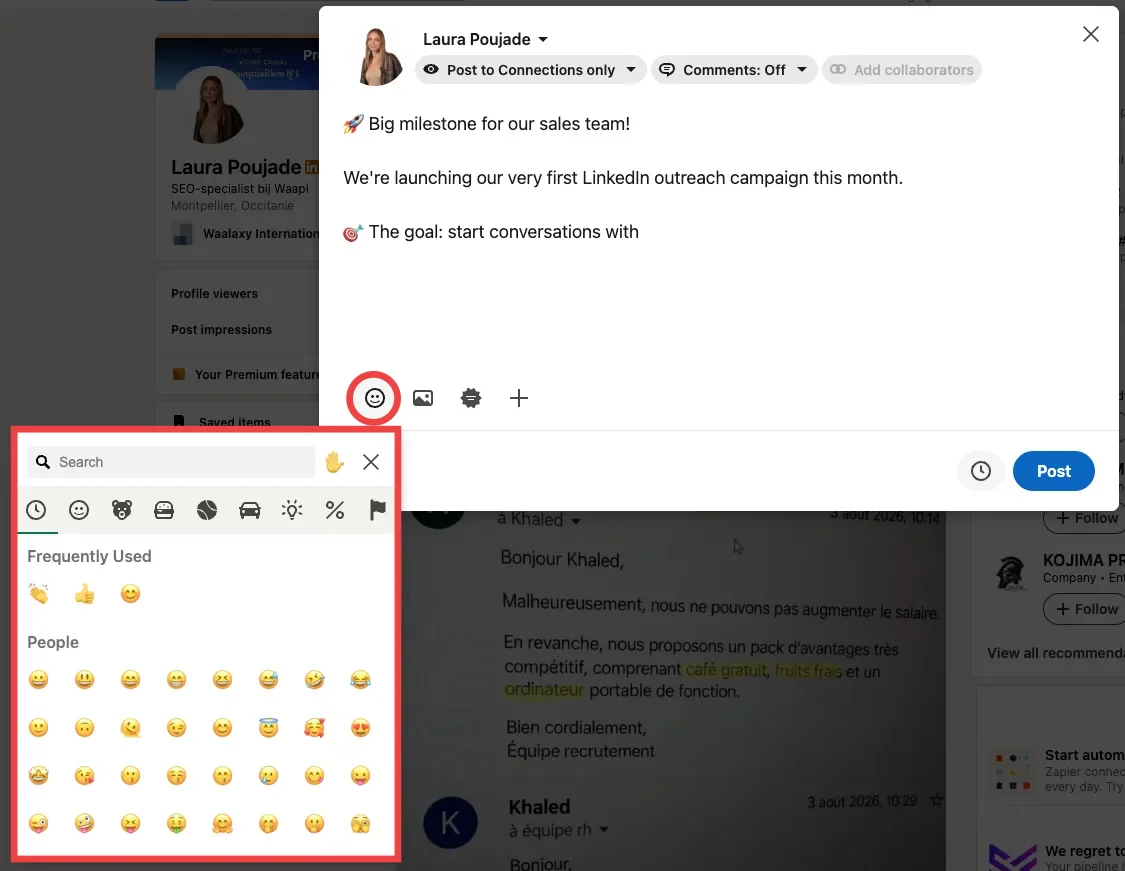
The only limit: this picker doesn't include the newest LinkedIn emojis. For those, use your keyboard shortcut or the list above.
Emoji keyboard shortcut on PC (Windows) and Mac
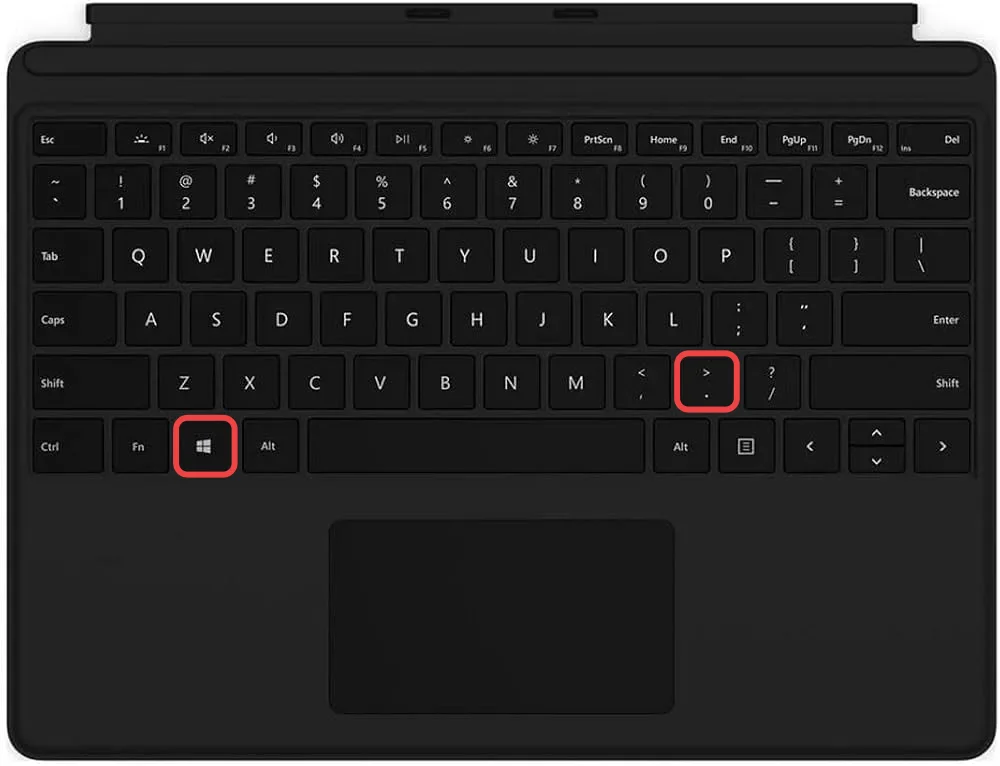
➡️ On Windows 10 and 11, press Windows + period or Windows + semicolon. The Windows emoji panel opens right where your cursor is, in LinkedIn as in any other app.
➡️ On Mac, the shortcut is Ctrl + Cmd + Space. The Character Viewer opens under your cursor, with a search bar. On recent MacBooks, the Fn key or the globe key at the bottom left of the keyboard does the same thing. Double-click an emoji to insert it. The viewer remembers your recent emojis, which is handy if you always use the same ones in your posts.
On mobile (iPhone and Android)
In the app, LinkedIn emojis come from your phone's keyboard. On iPhone, tap the smiley or globe icon at the bottom of the keyboard. On Android with Gboard, tap the smiley icon next to the space bar. Either way, the keyboard's search bar saves you from scrolling through hundreds of symbols.
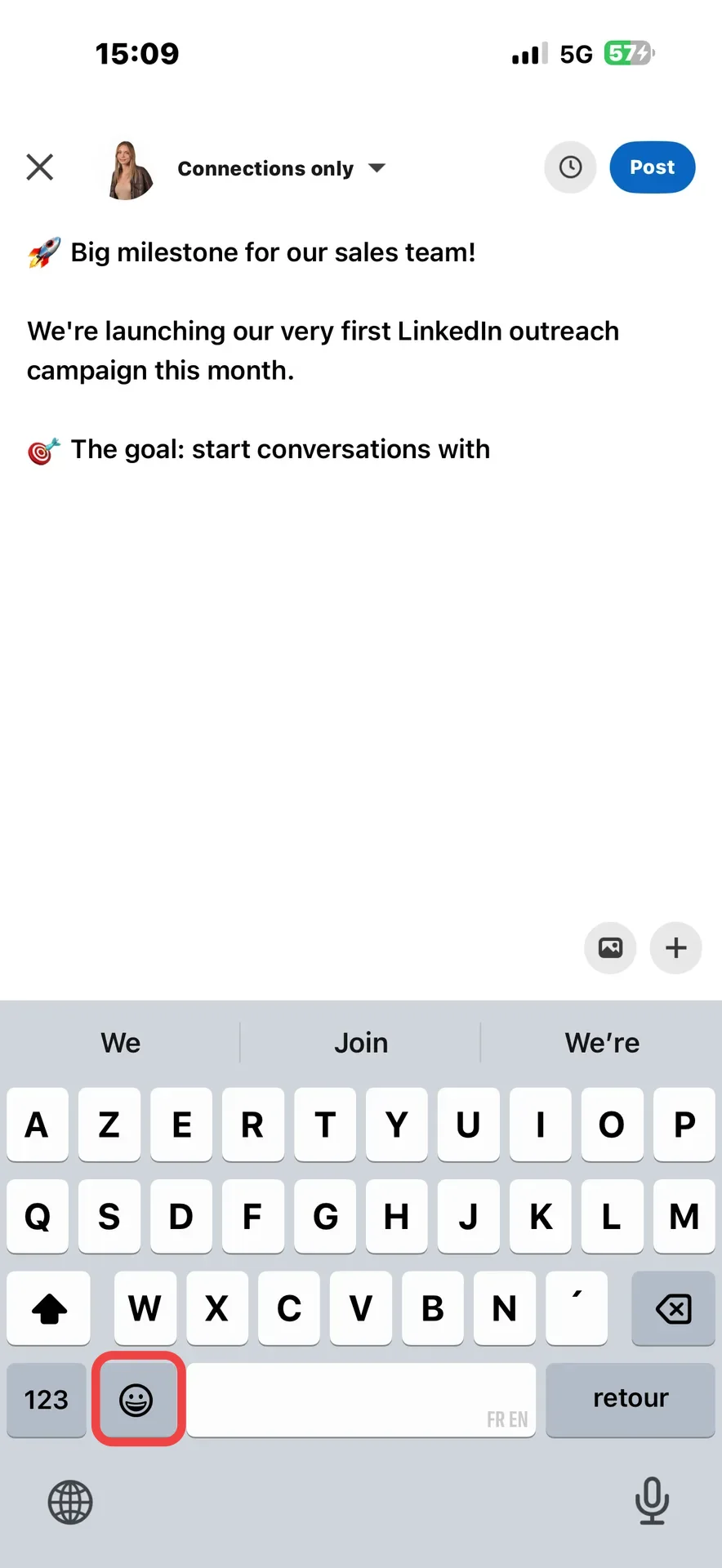
iPhone tip: type a word like "thanks", then tap the smiley icon. The keyboard suggests the matching emoji straight away.
With a Chrome extension
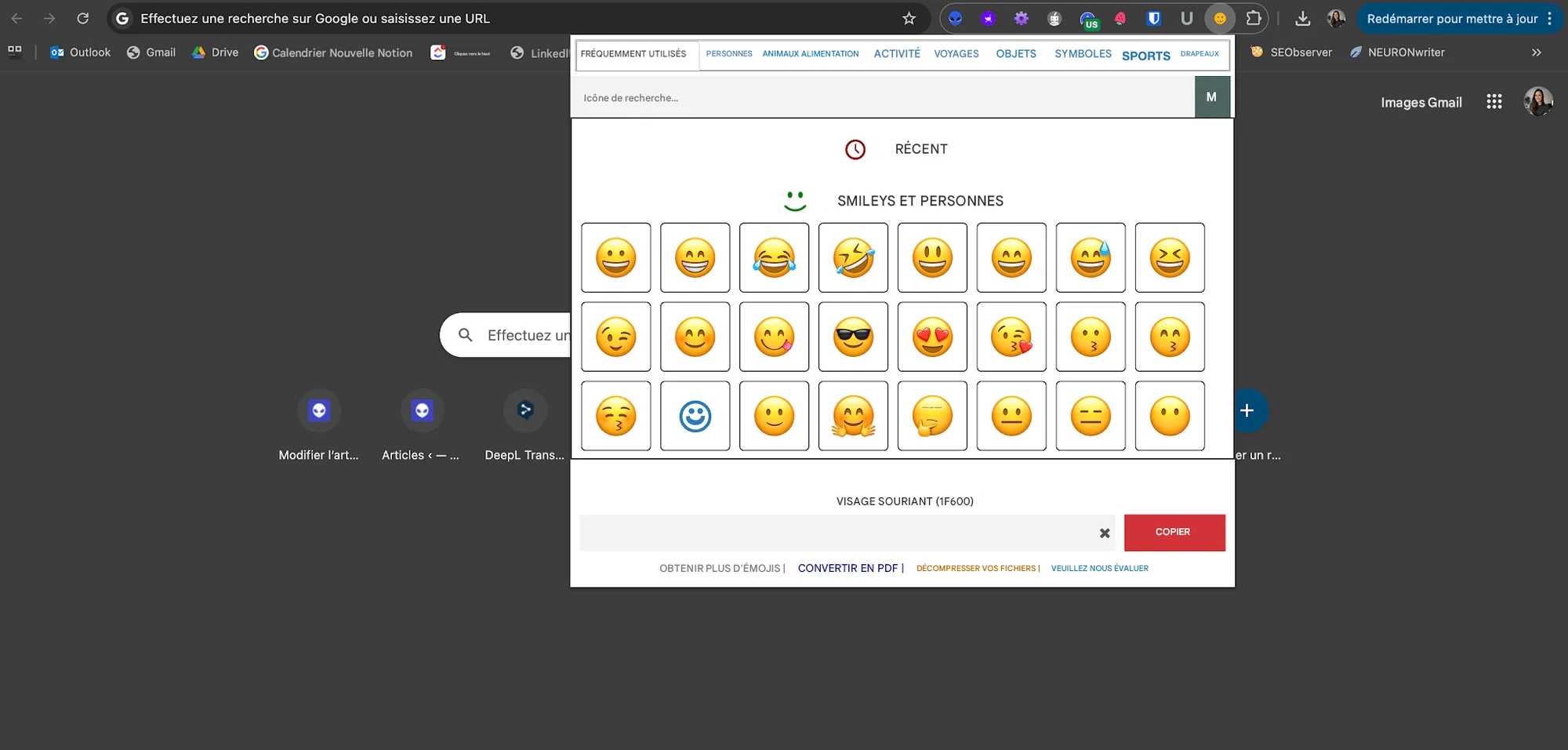
Do you mostly write in Chrome and don't like shortcuts? The free extension Emoji Keyboard adds an emoji button to your browser toolbar. Pin it, click the icon, pick your emoji, and it's copied to your clipboard.
All that's left is to paste your LinkedIn emoji into a post or a message.
Why does an emoji show up as a square on LinkedIn?
LinkedIn doesn't have its own emoji designs. Each device displays its own version: Apple on iPhone and Mac, Google or Samsung on Android, Microsoft on Windows. So a recent LinkedIn emoji can show up as an empty square for a reader whose system isn't up to date. According to Emojipedia, the picker in LinkedIn messaging actually stops at emojis released in 2016.
Which emojis to use on LinkedIn for each goal?
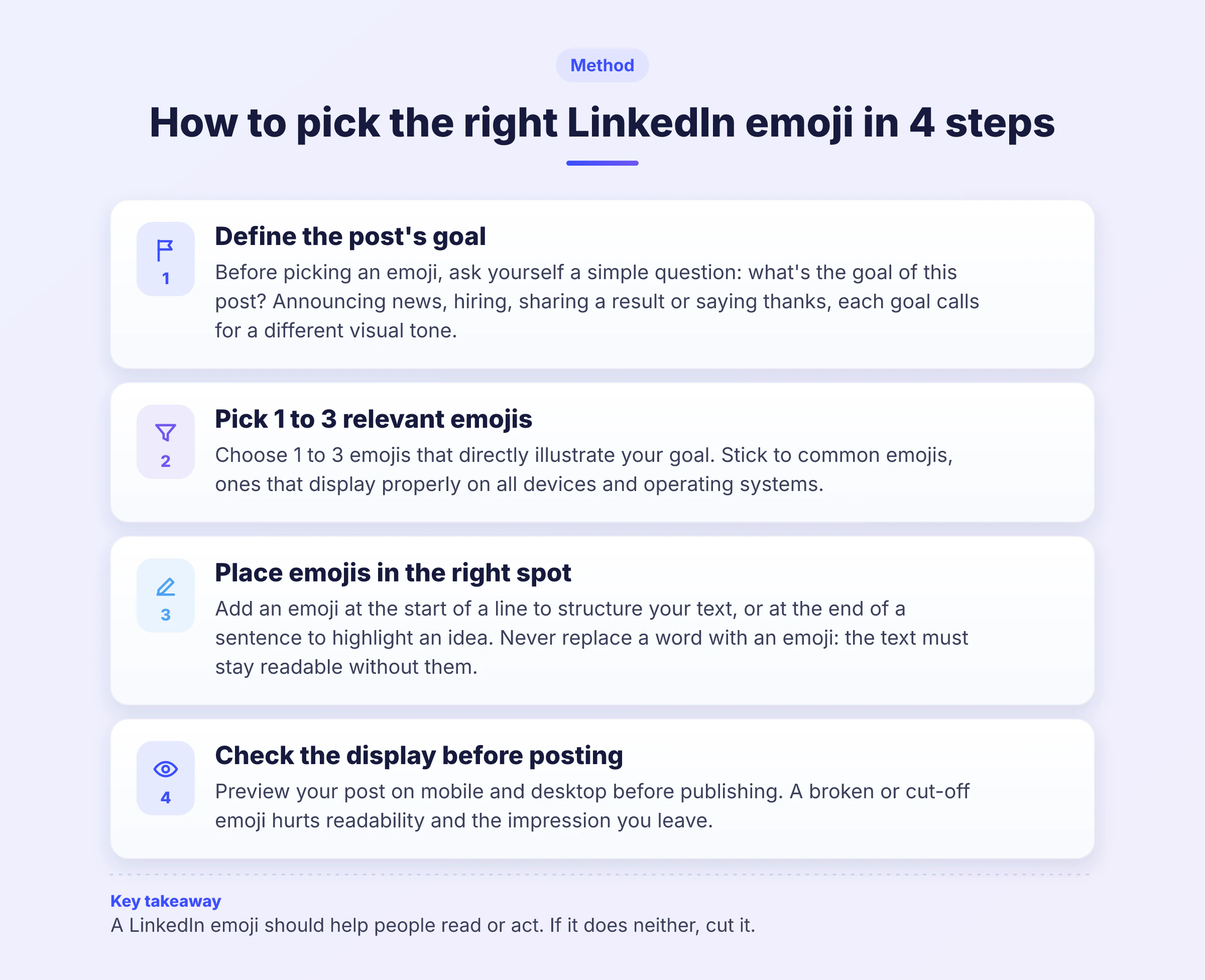
A good professional emoji isn't decoration. It replaces a word, structures a list or draws the eye to key information. Here's how to choose your LinkedIn emojis depending on what you post, on your profile or in your messages.
In a LinkedIn post
The first line decides whether your post gets read. That's where an emoji has the most impact, because it breaks up the block of text in the feed. For the rest of the structure, rely on the basics of a great LinkedIn post.
Post goal | Suggested emojis | Example first line |
|---|---|---|
Announcing a new job. | 🎉 💼 🙏 | "🎉 New chapter: I'm joining [company] as [role]." |
Hiring. | 📣 🔍 👉 | "📣 We're hiring a [role] in [city] 📍" |
Sharing results. | 📊 📈 ✅ | "📈 [Result] in [period]. Here's what we changed." |
Launching a product or an event. | 🚀 🗓️ 📍 | "🚀 It's the big day, [product] is live." |
Giving advice. | 💡 🧠 👉 | "💡 The mistake I see most often on profiles." |
Structuring a list. | ✅ 1️⃣ 🔹 | "✅ Step 1: [action]." |
Starting a discussion. | 💬 👇 🤔 | "👇 How do you handle it?" |
Saying thank you. | 🙏 🤝 ❤️ | "🙏 Thanks to [person] for [reason]." |
For a job announcement, start from complete LinkedIn recruitment post templates. And to work on your opening, pick from these examples of a LinkedIn catchphrase.
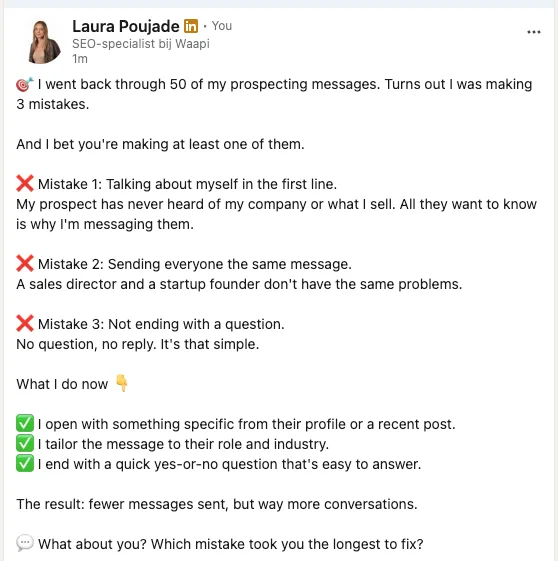
An example that works: here, Laura uses a few emojis to give her post some breathing room and guide the reader, without putting one on every line.
On your LinkedIn profile
On your profile, LinkedIn emojis mostly act as visual markers. Next to your LinkedIn job title in your headline, one or two emojis separate your areas of expertise and make your value proposition easier to read in search results. In the About section, they replace bullet points.
SaaS Business Developer 🚀 | Helping SMBs sign their first B2B clients | LinkedIn Prospecting 🎯
Keep it understated. A profile covered in emojis looks messy, especially to a recruiter or a decision-maker. For your intro text, follow the method for a strong LinkedIn summary, then add your emojis last.
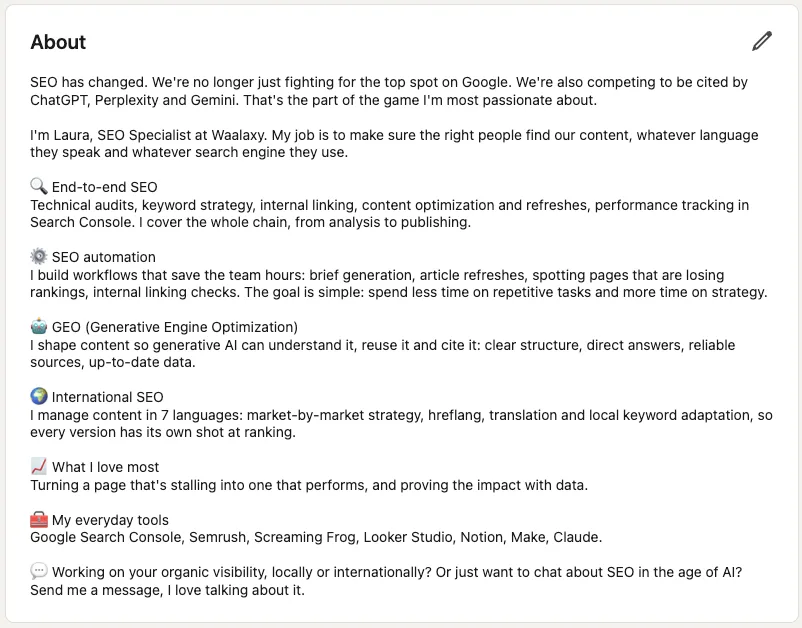
In this example, Amandine uses the heart for passion and the stars for creativity. Each emoji illustrates a word in her description, and it's this kind of detail that helps you optimize your LinkedIn profile without overdoing it.
Need a catchy headline before adding your LinkedIn emojis? This free generator gives you ideas in seconds.
In your prospecting messages
In LinkedIn prospecting, an emoji softens the tone, and LinkedIn emojis fit right in with private messages. A 👋 to open or a 🙂 at the end makes your approach more human, as long as you stick to one or two per message. In a LinkedIn invitation message, where every character counts, one is enough.
Some emojis instantly speak to a specific industry:
Recruiting: 🔍 💼.
Marketing: 🎯 🚀.
Training: 🎓 💻.
Event or location: 📍 🗓️.
Helping out: 🤝 🛟.
Sharing a resource: 🔗 📲.
Here's an example of a private message where the LinkedIn emoji opens the conversation without sounding too casual.
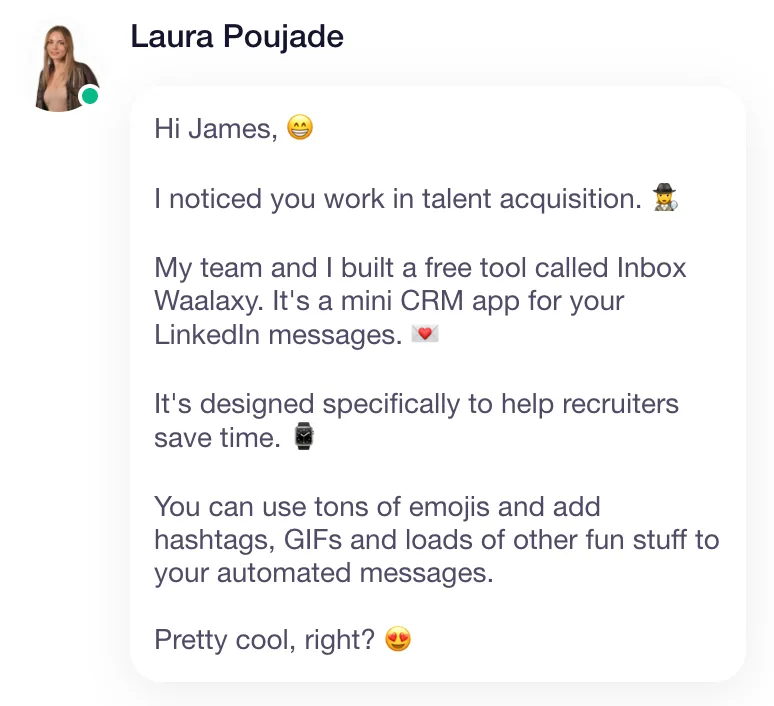
The rest of the message does the work: a clear reason for reaching out and a simple question. To get the substance right, rely on the best practices for a prospecting message and on what boosts your LinkedIn response rate.
When you reach out to dozens of prospects a week, you can keep this tone without writing everything by hand. Waalaxy chains invitations, messages and automatic follow-ups in a single campaign, and Waami, its AI message generator, helps you write an opener that you then personalize. To get started, follow the steps to launch your first Waalaxy campaign.
How many LinkedIn emojis should you use, and which mistakes should you avoid?
There's no magic number, but the data shows a trend. An Into the Minds study of 4.6 million LinkedIn posts shows that 80% of posts contain no emoji at all. Posts with 15 to 16 emojis are 2.5 times more likely to reach 100 reactions. The study dates from 2021 and measures a correlation, not a cause, since a post full of emojis is often a more carefully crafted post too.
How many emojis per LinkedIn post?
In practice, adjust the number to the length of the post and your tone. A short, serious post can handle 1 to 3 emojis. A long post structured as a list can have around ten, one per bullet. What matters is that every emoji has a job: hooking, structuring or calling to action.
Where you write | Recommended number of emojis |
|---|---|
Short post (under 5 lines). | 1 to 3. |
Long post structured as a list. | 1 per bullet, up to about ten. |
Headline. | 1 to 2. |
Prospecting message. | 0 to 2. |
Comment. | 0 to 1. |
Also think about the other visual elements in your text. Hashtags in a LinkedIn post should be used just as sparingly, and the same goes for a LinkedIn GIF.
Mistakes to avoid with LinkedIn emojis
Most slip-ups come from a badly placed LinkedIn emoji rather than one too many. Here are the five most common.
An emoji that contradicts the text, like a skeptical face 🤨 at the end of an affirmative sentence.
An emoji on every line, which drowns the information instead of guiding the reader.
Emojis with a double meaning, which some readers will misread.
Emojis in a sensitive message, like a departure, a contract termination or a customer complaint.
An emoji that replaces an important word. Write "meeting" rather than a calendar on its own: your reader shouldn't have to guess.
One last point that often gets overlooked: accessibility. Screen readers read out the name of every emoji, so a line of five rockets becomes "rocket rocket rocket rocket rocket" for a visually impaired person. Put your emojis at the end of a sentence, never in place of a word.
In terms of visibility, emojis don't boost a post on their own. The LinkedIn algorithm mostly looks at reactions and dwell time, and a well-placed emoji helps catch the eye, which in turn lifts your engagement rate.
LinkedIn reactions, the network's official emojis
Reactions are the only official LinkedIn emojis. They appear when you hover over the Like button on a post, or when you long-press it on mobile. There are six of them:
👍 Like, the default reaction.
👏 Celebrate, to congratulate.
Support (the hand holding a heart), to show you've got someone's back.
❤️ Love, for content that moves you.
💡 Insightful, for a post that teaches you something.
😆 Funny, the newest one, for a post that makes you laugh.
The Funny reaction has a story, and you'll find it in this article on the LinkedIn Funny emoji.
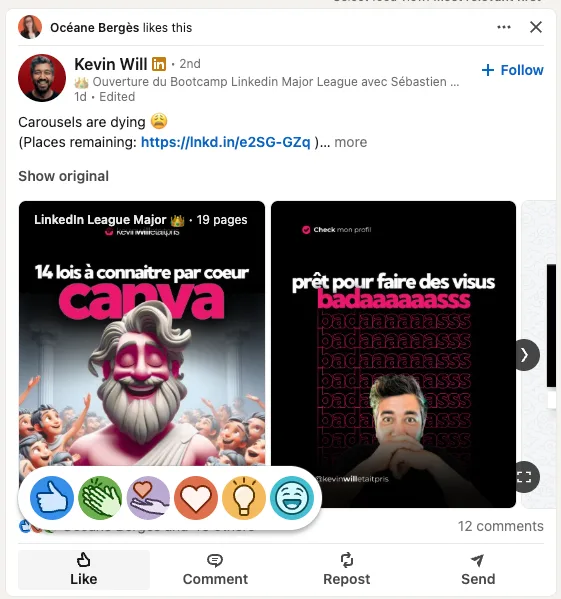
Every reaction sends LinkedIn an interest signal. To get more of them on your own posts, apply these tips to earn more LinkedIn likes and comments.
LinkedIn emoji: key takeaways
A well-chosen LinkedIn emoji makes your post easier to read, your profile more memorable and your messages more human. Bookmark this list, use keyboard shortcuts to save time, and choose each emoji for what it brings to your reader.
The real lever is still the substance: a clear message sent to the right person. If you prospect on LinkedIn, that's where Waalaxy saves you time, by automating your invitations and follow-ups while you focus on the replies.
Still have a question? The answers to the most common ones are right below.
FAQ: LinkedIn emoji
You have four options, depending on the device you use:
LinkedIn's smiley button, in the post composer, comments and messaging.
The Windows + period shortcut on PC.
The Ctrl + Cmd + Space shortcut on Mac.
Your phone's emoji keyboard in the mobile app.
And if you're looking for a specific emoji, the easiest way is still to copy it from the list at the top of this page. If you write with a LinkedIn post generator, add your emojis when you proofread: that's when you see where they really help.
In professional posts, the LinkedIn emojis you see most are the ones that structure or celebrate: 🚀 for a launch, ✅ for a list, 👉 to point to information, 🎉 for good news, 🙏 to say thanks and 🔥 for big news. Expressive smileys like 😂 work better in comments than in posts. Choose them based on your message, not their popularity, and check their meaning in the table above.
An emoticon is a face drawn with punctuation marks, like :-) or ;-). An emoji is a color pictogram, encoded in Unicode, that can show a face but also an object, a place or a flag. A kaomoji is a Japanese emoticon that reads upright, like (^▽^). In everyday language, people often say "LinkedIn emoticons" when they mean emojis, and both are pasted the same way.
How an emoji displays depends on the reader's device, not on LinkedIn. If their phone or computer isn't up to date, a recent emoji shows up as an empty square or a question mark. To avoid this:
Stick to common emojis in your headline and first lines.
Avoid emojis released in the last two years in a prospecting message.
Check your post on mobile and desktop before publishing it.
Yes, and it's actually one of the best places to use them, as long as you stick to one or two. An emoji can separate two areas of expertise or highlight your value proposition, for example "Growth Marketer 🚀 | Helping startups find their first customers". Avoid starting your headline with an emoji, though: your role should be the first thing people read. For the full method, follow this guide to writing a strong LinkedIn headline.
For a short post, 1 to 3 emojis are enough. For a long list-style post, count one emoji per bullet, so about ten at most. The Into the Minds study shows that emoji-rich posts reach 100 reactions more often, but it's a correlation. An emoji is only worth it if it helps people read or act. If in doubt, remove one and reread your post: if it reads just as well, you didn't need it.
Yes, as long as they serve your message. LinkedIn has become a more conversational network, and emojis on LinkedIn are common in posts, comments and messages. Just adapt how many you use to your industry and the person you're talking to: more restrained with a CFO than with a marketing team. Used in the right amount, they strengthen your LinkedIn personal branding by making your voice recognizable. To build them into a consistent editorial line, rely on a real LinkedIn content strategy.