
Are you trying to build a career page on LinkedIn? On LinkedIn, a candidate no longer reads a job posting alone. They look at who you are, they compare your company culture to the competitor next door, and they decide whether to apply before ever speaking to a recruiter. A LinkedIn company page without a polished career tab loses candidates silently. This article explains what a LinkedIn career page is, why it matters for your employer brand, and how to build it, step by step.
What is a LinkedIn career page?
A LinkedIn career page is the Life tab of your company page. Unlike the Home tab, which shows your posts, or the About tab, which lists your legal information, this space is built to tell people who you are as an employer. It's the showcase a candidate checks before deciding to apply to your company.
You can publish day-to-day photos, employee testimonials, links to your blog articles or your job openings there. Every piece you add reinforces the image a visitor forms of your company, well before they apply or reach out.
Why employer branding goes through LinkedIn
A large share of candidates check a company's page before applying. Company values have become as important a factor as salary for some of them, and they no longer hesitate to look into how you operate before sending their resume. LinkedIn has become the pillar of employer brand communication, the place where you build awareness and share your culture to convince the right profiles to join you instead of a competitor.
A neglected career page sends the opposite signal. An empty or never-updated tab suggests nothing is happening at your company, even when that's false. The content you publish here works for you around the clock, with no ad budget, unlike a LinkedIn sponsored campaign that stops the moment the budget runs out.
It's also an argument in negotiations. A candidate who has already seen your career page before the interview arrives with sharper questions and a decision that's nearly made. You spend less time selling the company and more time evaluating the profile.
Key features of the Life tab
To attract the right profiles, the Life tab offers a real cascade of features. As a page admin, you create several personalized views and choose which one displays based on the visitor's profile. An engineer browsing your page can see different content from what's shown to a marketing profile or a candidate for the finance team. Each target audience sees a version of your page built for them, which increases your chances of convincing them to apply.
Nike illustrates this well. The brand uses this space to present its mission, its convictions, and to project the visitor into its work environment rather than settling for a list of open roles.
What content to publish in the Life tab
Format matters less than consistency. A page that posts a little but often beats a page that posts a lot once before being forgotten. A few formats that work well for this kind of page:
A short video testimonial from an employee explaining their day-to-day in their own role.
A series of photos taken in-house, without excessive staging, to show what happens behind the scenes.
A link to a blog article detailing an aspect of your culture or your ways of working.
An open job posting paired with a note from the hiring manager, rather than a plain job description.
Avoid betting everything on a single format. A career page that alternates videos, photos, and testimonials holds up longer than a page that only posts job openings.
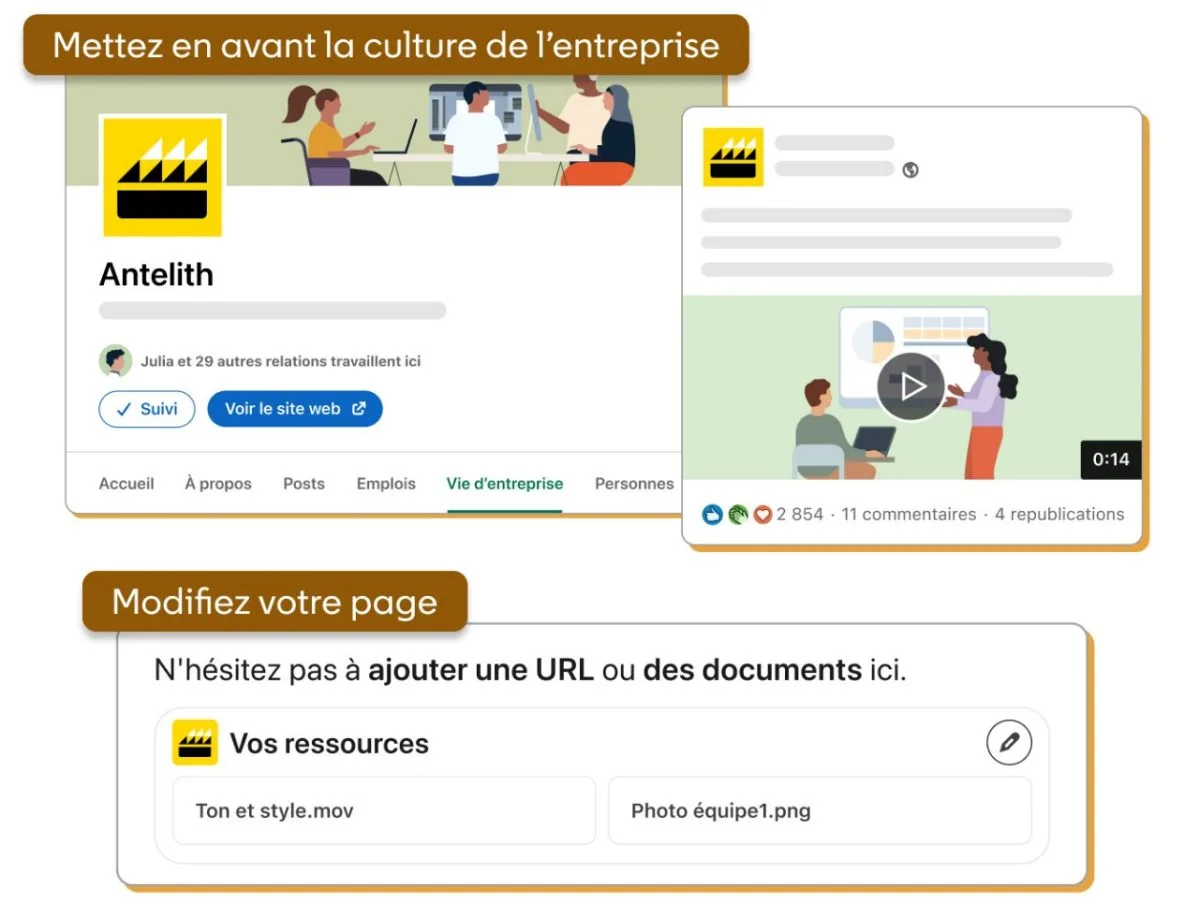
LinkedIn itself illustrates this principle in its own guide to the Life tab: highlighting culture (team photo, short commented video) and an editable "Your resources" area to add a URL or a document, rather than a plain list of job posts.
How to build your LinkedIn career page step by step
Here's how to build a career page that makes people want to apply.
Create or optimize your LinkedIn company page first. Without a complete company page, the career tab has no foundation to exist on.
Activate the Life tab from your page's admin settings.
Set up personalized views by target audience, one for tech profiles, one for sales, one for finance, for example.
Publish fresh content every week: team photos, employee testimonials, links to your articles or your openings.
Measure your page's engagement and adjust the content based on what attracts the most qualified applications.
This work runs alongside your regular LinkedIn company page. Check our full guide to LinkedIn platform knowledge if you're starting from scratch on the rest of your presence.
Your employees carry your employer brand too
Your career page isn't the only lever. Every employee who shares their day-to-day on their own LinkedIn profile extends your employer brand's reach well beyond your company page. A recruiter or manager who builds up their own LinkedIn network naturally attracts more spontaneous applications, on top of those generated by the career page itself.
To go further, find out how to find candidates on LinkedIn beyond your career page alone.
Mistakes to avoid on your LinkedIn career page
Don't publish only job postings. A career page that looks like a job board doesn't build trust.
Don't ignore comments on your posts. A candidate who asks a question and never gets an answer takes away one thing: silence.
Don't leave the page abandoned after launch. A page frozen for six months sends the opposite signal to the one you're going for.
Don't copy the corporate tone of your institutional website. LinkedIn rewards pages that sound like humans, not press releases.
Conclusion
You now know why building a career page on LinkedIn isn't an HR box to check. It's a free lever that keeps working for you around the clock, as long as you take the time to feed it. Start small: activate the tab, publish a first team photo, and let the rest follow.
FAQ
It's the section of your LinkedIn page dedicated to company culture and recruiting. It gathers photos, testimonials, and personalized views by audience, unlike the Home and About tabs.
From LinkedIn, click Create a Page under the Products menu, choose the Company type, fill in the name, industry, and logo, then publish. The Life tab is then activated from the admin settings.
Only page admins added manually can publish, set up personalized views, and manage the Life tab. An employee without that role can only follow the page and interact with it.
Yes. Creating and running a company page, including its Life tab, costs nothing. LinkedIn's paid options concern advertising and certain recruiting tools, not the page itself.
It generally takes several weeks of regular publishing before a career page generates visible spontaneous applications. The lever is cumulative, not immediate.