
Got a question about Waalaxy? This FAQ gathers the questions we get asked the most: getting started, prospecting, keeping your LinkedIn account safe, managing your subscription, connecting your tools. Each answer links to a full guide if you want to go further. Can't find your answer here? Live chat replies in under 5 minutes.
Getting started on Waalaxy
What is Waalaxy?
Waalaxy is a tool for automating LinkedIn and email outreach. It lets you reach hundreds of qualified prospects every month: connection requests, messages, and follow-ups, without spending your days on it. Waalaxy works for sales reps and founders as much as for recruiters or marketers who want to grow their network. To understand where LinkedIn fits into this, What is LinkedIn? covers the basics of the network Waalaxy runs on.
How do I get started on Waalaxy?
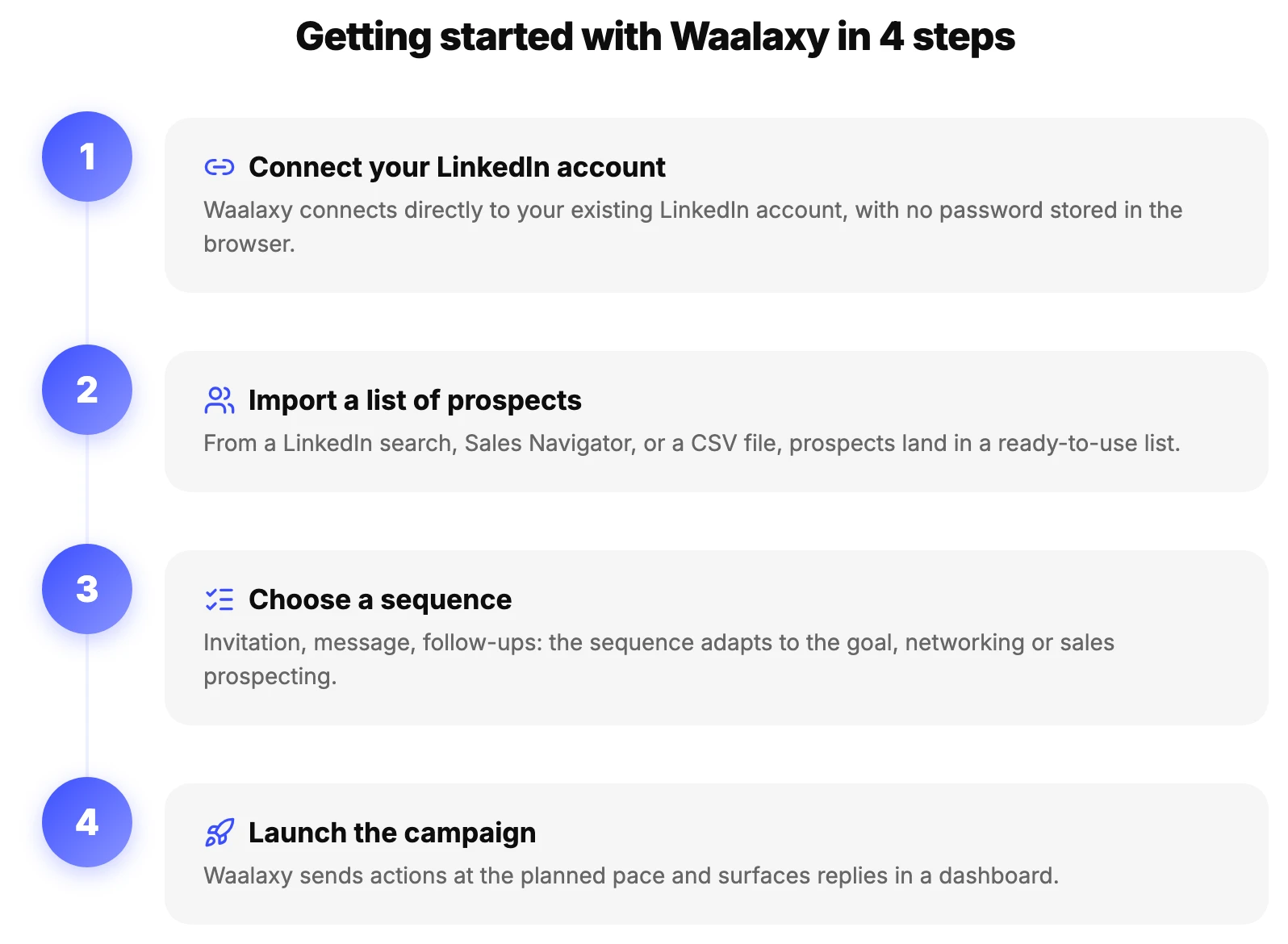
Four steps are enough: connect your LinkedIn account, import a list of prospects, pick a sequence that matches your goal, then launch your first campaign. Waalaxy then gives you a dashboard to track replies in real time. The Help Center guide walks through every screen step by step, with screenshots.
Does Waalaxy work without a Chrome extension?
Yes. Waalaxy is now 100% cloud: campaigns run on Waalaxy's servers, not on your computer. You can turn your computer off, actions keep sending on schedule. That's a real change from older automation tools, which required keeping a browser open at all times. The full explanation is in Waalaxy Cloud.
Prospecting with Waalaxy
How do I launch my first campaign?
From the Campaigns tab, pick a list of prospects, a sequence (invitation, message, follow-up), then launch it. Waalaxy automatically manages the delays between each action to keep a natural sending pace. Waalaxy Campaign: the full FAQ covers the more technical questions (statuses, editing mid-run, common errors).
How does a Waalaxy campaign work?
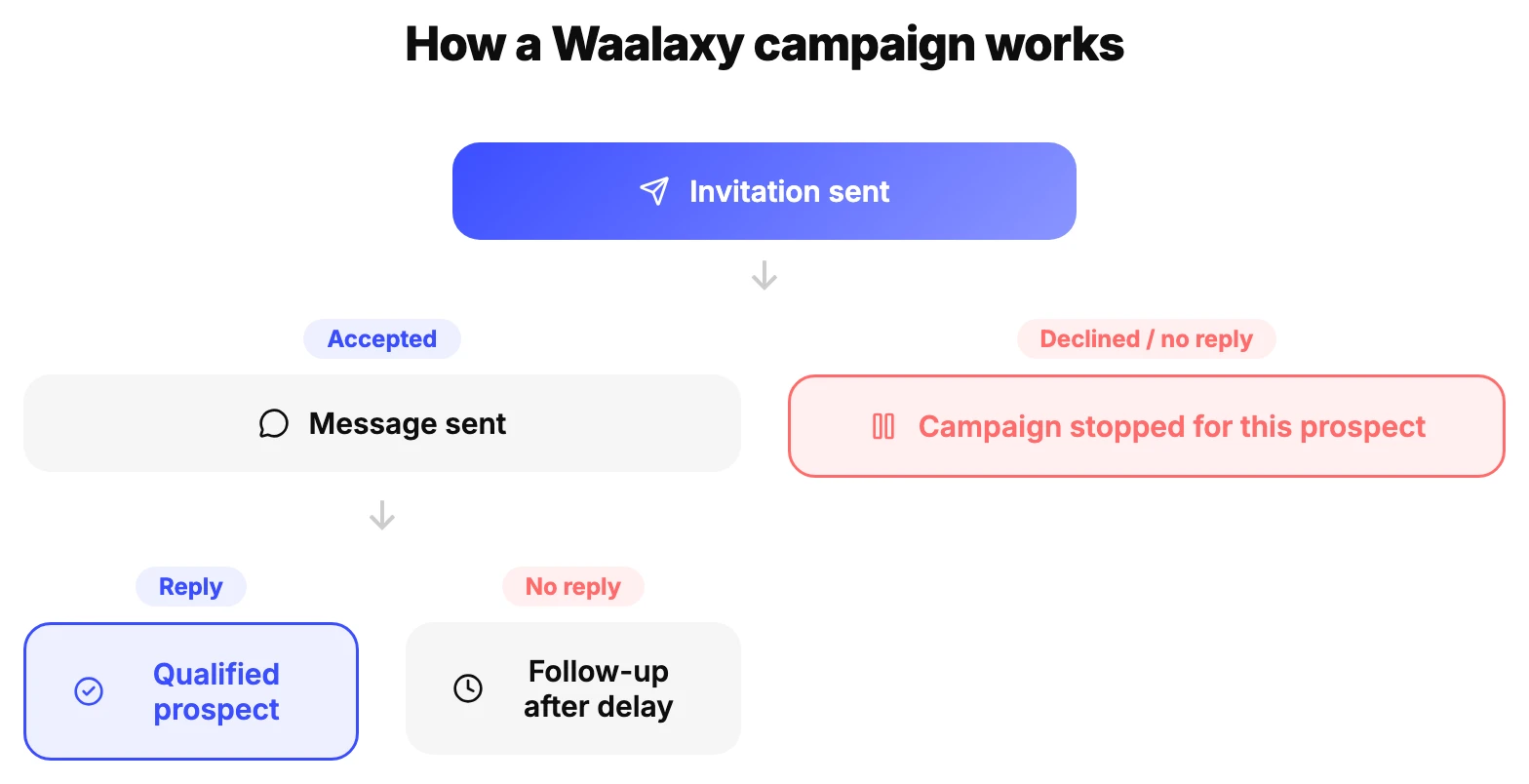
Each prospect moves through the sequence based on their reply: do they accept the invitation? do they reply to the message? Waalaxy adapts automatically, sends a follow-up if there's no reply, and stops if the prospect says they're not interested. Delays between two actions are configurable and capped by safety quotas.
How do I choose the right prospecting sequence?
It depends on the goal: a short sequence for networking, a sequence with several follow-ups for sales prospecting, or a multichannel sequence combining LinkedIn and email to maximize reply chances. How to prospect effectively on LinkedIn covers the sequences that perform best depending on industry and target.
What are the queue and the quotas on Waalaxy?
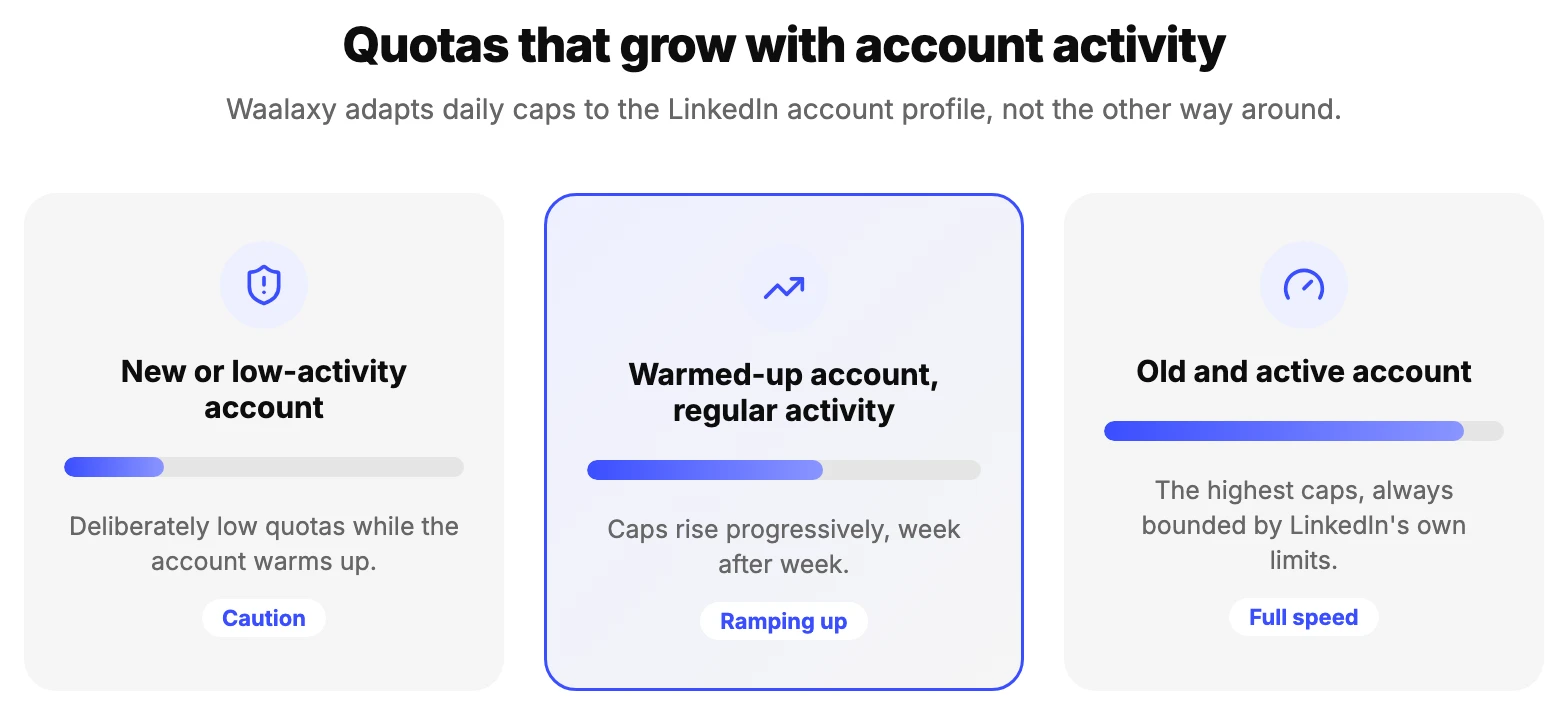
The queue lists every scheduled action waiting to be sent, campaign by campaign. Quotas are daily caps (number of invitations, messages) that protect your LinkedIn account by staying within the limits the platform tolerates. These caps rise progressively as the account gains age and activity. The rules are detailed in How Waalaxy's delays and quotas work and How the queue works.
What is Waami, the AI writing assistant?
Waami is the AI assistant built into Waalaxy. It writes invitation notes and prospecting messages from a few details: the target, the value proposition, the tone you want. Waami works directly from the message editor, no need to switch tools. The full feature is covered in How to use Waami AI.
How do I manage and sort my prospect lists?
Filters, tags, and an exclusion system (Do Not Contact) let you organize your lists and avoid recontacting the same people from one campaign to the next. Waalaxy also caps how many prospecting actions you can run based on your plan, detailed in Prospecting actions: what are the limits.
LinkedIn account & safety
What LinkedIn restrictions should I know about?
LinkedIn caps the number of invitations and messages sent per day, especially when it detects an automation tool. Going over those limits triggers a warning, then a temporary restriction on some features (blocked invitations, read-only account). How to avoid restrictions on LinkedIn and the Help Center guide detail the thresholds not to cross.
How do I warm up my LinkedIn account?
Warming up an account means gradually increasing its activity (manual connections, messages, profile views) before launching intense automated prospecting. A new or low-activity account should be warmed up over several weeks to get LinkedIn used to its behavior before reaching maximum quotas. The full method is in How to warm up my LinkedIn account.
What should I do if I get a LinkedIn warning or restriction?
Stop all automation immediately, reduce your quotas to the minimum, and stick to manual activity for several weeks before resuming, at low volume. Resuming too fast after a restriction risks a harsher penalty. Adapting your prospecting to LinkedIn warnings and the Help Center guide detail the steps to take depending on the type of restriction received.
How do I import prospects from LinkedIn or Sales Navigator?
From a regular LinkedIn search or a Sales Navigator search, Waalaxy imports the results straight into a prospect list, no manual work or file export needed. LinkedIn Sales Navigator: the ultimate guide explains how to build a relevant search before importing.
Emails and enrichment
How does email enrichment work?
Waalaxy finds a prospect's professional email address from their LinkedIn profile, which lets you prospect multichannel (LinkedIn and email) in the same campaign, with automatic follow-ups on both channels. Success rate depends on the public information available on the profile. The details are in Waalaxy email enrichment.
How do I launch an email campaign?
After syncing your mailbox (Gmail or Outlook), you can build an email sequence with automatic follow-ups, exactly like a LinkedIn campaign. How to sync your email account with Waalaxy covers connecting both mailboxes.
Subscription and billing
What are the different Waalaxy subscriptions?
Waalaxy offers several plans, from a limited free tier to subscriptions built for teams, with growing contact caps and features (Waami, email enrichment, Team plan). Which Waalaxy subscription to choose details the caps and features of each tier to help you pick based on your prospecting volume.
How do I cancel or get refunded?
Cancellation happens directly from your account's billing settings, no need to go through support. Refund conditions depend on the plan chosen and are shown at checkout. The Help Center covers the full procedure.
Integrations and AI
Does Waalaxy integrate with a CRM?
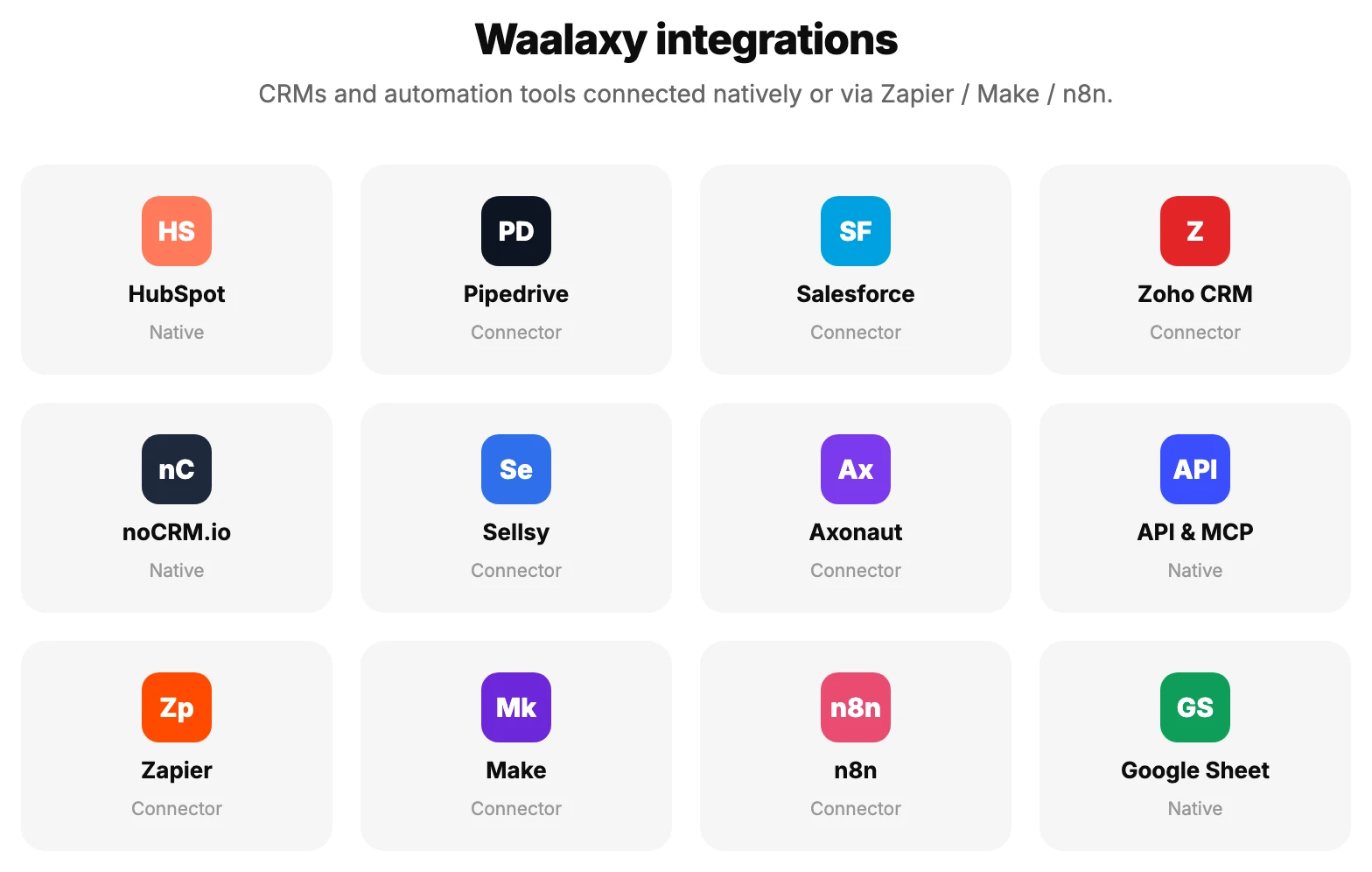
Yes, Waalaxy connects to HubSpot, Pipedrive, Salesforce, Zoho CRM, noCRM.io, Sellsy and Axonaut, to automatically sync prospects who reply. Each integration has its own guide: Waalaxy x HubSpot, Waalaxy x Pipedrive, Waalaxy x Salesforce and Waalaxy x ZohoCRM.
Does Waalaxy connect to Zapier, Make or n8n?
Yes, through dedicated connectors that let you automatically export Waalaxy prospects to hundreds of other tools, no code required. How to sync Waalaxy with a CRM via Zapier and How to sync Waalaxy and Make cover the two most used tools; n8n is detailed in the Help Center.
How do I use AI with Waalaxy?
Waalaxy offers an API, an MCP server compatible with AI assistants like Claude or ChatGPT, and a dedicated skill to run your campaigns straight from an AI tool in natural language. The Help Center covers the full setup.
Working as a team
How do I invite my team to Waalaxy?
From the Team space, you can invite members, assign them a role and permissions, and track the whole team's campaigns from a shared dashboard. The Team plan also includes duplicate control so two members never contact the same prospect. The full setup is covered in Team prospecting with Waalaxy, and the Help Center details how to add team members.
Conclusion
This Waalaxy FAQ covers the most common questions, from your first campaign to LinkedIn account safety and integrations. Still can't find an answer? Support replies live in under 5 minutes, and the Waalaxy Help Center covers over 130 more articles.